


I've activated the ability for Registered Users to turn on Push Notifications, and configured the Progressive Web App (PWA).
Push Notifications
Next time anyone who is registered visits the forum, there will be a green pop-up bar at the bottom of the screen asking to enable push notifications.
Notifications on desktop are browser-based. For mobile push notifications, you need to install the PWA (see below)
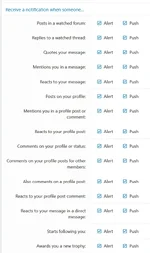
Push Notifiations (and also Alerts = the bell icon in the upper right) are configurable under your Preferences (lots of options here!)
Push Notifications will also go to your mobile device if you have added it to your home screen via the PWA, just like any other app you have installed.
Progressive Web App (PWA)
This sounds fancy, like I spent a ton of money on creating a custom app, but that's not the case. PWA is actually not an app, so there is nothing to download. Smartphone users have always had an option to turn any website into an "app icon" and place it on the home screen (i.e. give it an icon that looks like an app)
What's different is that Xenforo (the forum software running on this site) is designed to make this function just like an app including the familiar Push Notifications and Counters (number in a red dot).
Here is how you set it up (it's really easy)
(photos are iOS, Android photos to come)
1) While in a browser on your phone, make sure you are on the main landing page for the forum (i.e. tap "HOME")
2) Select the Share icon. This is usually near the browser bar (where you can see the website URL) and is a square icon with the arrow pointing up
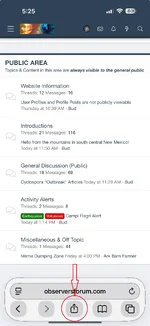
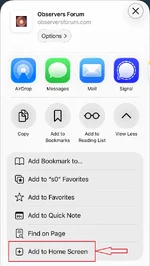
3) Select "Add to Home Screen" - you may have to swipe up or down to find that.
4) The configuration screen should default to naming it "Observers", but you can rename it if you like.
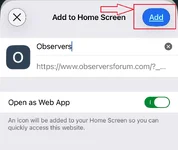
5) Save
Simple. Boom. App Icon on home screen.
You will notice that, when using the PWA app, there is no browser bar - you are locked to this site while in the app. It's like a desktop shortcut straight to thie forum, but on your phone.
One thing to note: sharing. Some users, when they want to share something, will copy the URL from the browser bar. However, the browser bar is gone in the app. The good news is that you can share any page, thread, or even a specific post without having a browser bar (even on desktop). Look for the symbol with 3 circles joined by lines - that's the share button.
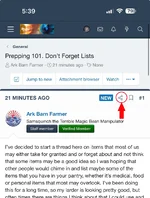
Select that, and it gives you multiple sharing options. This is also present at the bottom of every page, as well in many other places throughout the forum

Thanks for reading, and if you have any questions, please ask!!
Bud
Push Notifications
Next time anyone who is registered visits the forum, there will be a green pop-up bar at the bottom of the screen asking to enable push notifications.
Notifications on desktop are browser-based. For mobile push notifications, you need to install the PWA (see below)
Push Notifiations (and also Alerts = the bell icon in the upper right) are configurable under your Preferences (lots of options here!)
Push Notifications will also go to your mobile device if you have added it to your home screen via the PWA, just like any other app you have installed.
Progressive Web App (PWA)
This sounds fancy, like I spent a ton of money on creating a custom app, but that's not the case. PWA is actually not an app, so there is nothing to download. Smartphone users have always had an option to turn any website into an "app icon" and place it on the home screen (i.e. give it an icon that looks like an app)
What's different is that Xenforo (the forum software running on this site) is designed to make this function just like an app including the familiar Push Notifications and Counters (number in a red dot).
Here is how you set it up (it's really easy)
(photos are iOS, Android photos to come)
1) While in a browser on your phone, make sure you are on the main landing page for the forum (i.e. tap "HOME")
2) Select the Share icon. This is usually near the browser bar (where you can see the website URL) and is a square icon with the arrow pointing up
3) Select "Add to Home Screen" - you may have to swipe up or down to find that.
4) The configuration screen should default to naming it "Observers", but you can rename it if you like.
5) Save
Simple. Boom. App Icon on home screen.
You will notice that, when using the PWA app, there is no browser bar - you are locked to this site while in the app. It's like a desktop shortcut straight to thie forum, but on your phone.
One thing to note: sharing. Some users, when they want to share something, will copy the URL from the browser bar. However, the browser bar is gone in the app. The good news is that you can share any page, thread, or even a specific post without having a browser bar (even on desktop). Look for the symbol with 3 circles joined by lines - that's the share button.
Select that, and it gives you multiple sharing options. This is also present at the bottom of every page, as well in many other places throughout the forum
Thanks for reading, and if you have any questions, please ask!!
Bud
Last edited: